Comparison
Which is bigger or smaller?
Examples: Revenue by region, performance vs targets, product rankings
Best charts:
Bar Chart,
Column Chart
 Insight Stream | Data Analytics & Visualisation Guide
Transform complex data into compelling insights that drive decisions. Learn which visualizations work best for your message and how to design reports that engage your audience in 10 seconds or less.
Find the perfect chart for your question - comparison, trend, correlation, distribution, composition, or ranking.
Interactive tool to help you choose the right visualization based on your data and message.
Fun personality quiz! Answer 7 questions to discover which chart type matches your data style.
Professional color schemes for accessible, beautiful visualizations. Copy hex codes with one click.
Real-world examples showing how to transform data into actionable insights.
Download cheat sheets, checklists, and reference guides. No email required.
Gallery of visualization mistakes to avoid. Learn what not to do with before/after examples.
Learn the four core principles: clarity, simplicity, accuracy, and relevance.
See how effective visualization transforms business outcomes
From 4 hours of manual spreadsheet work to 15 minutes of automated insights. See how a B2B company transformed their sales reporting.
Warehouse dashboard redesign reduced meeting time from 45 minutes to 10 minutes while improving decision quality.
SaaS company transformed marketing analytics from 6-hour weekly reports to 90 minutes with clear funnel visualization and attribution tracking.
Manufacturing company automated variance analysis and used waterfall charts to transform financial reporting, cutting close time by 70% and board meetings by 83%.
Tech company built hiring pipeline dashboard that revealed bottlenecks. Funnel visualization cut time-to-hire from 60 to 36 days while reducing recruiting costs by 25%.
Search for chart types, use cases, or data questions
Most commonly used charts for data storytelling
A bar chart compares categories such as routes, carriers, or depots side by side. It’s the simplest and most honest way ...
Line charts show how logistics metrics change through time — transit durations, order volume, fuel cost, or on-time rate...
Pie charts show how a few categories contribute to a whole. Use them when audiences want a quick, high-level sense of sh...
Scatter plots reveal how two supply-chain measures move together — such as freight cost versus on-time delivery rate.
Real feedback from data professionals using these principles
“This guide completely changed how I approach dashboards. The 10-second rule alone saved our team countless hours in meetings. Our executives actually understand the data now!”
“I was creating pie charts for everything. Now I understand when to use bar charts, when to use trends, and why it matters. My reports are clearer and decisions happen faster.”
“Finally, a visualization guide that explains the 'why' not just the 'how'. The case studies are gold – I showed our warehouse example to my team and it clicked immediately.”
All visualisations serve a purpose. Every chart answers one of six questions - pick yours:
Which is bigger or smaller?
How is this changing over time?
Are these two things related?
How is data spread out?
What makes up the whole?
What's the order from best to worst?
Follow these principles when building reports to deliver quality insights and ensure engagement.
Well-designed visuals help your audience understand the data story. Avoid ambiguity and unnecessary complexity that will confuse and turn off the audience.
Keep consistency in your layouts and formatting. Have design best practices and stick to them. Consider your audience location - North America represents dates differently than the rest of the world.
Keep the report simple and clean. Everything you visualise should be relative to the data story and serve a purpose. Overcrowding with too many visuals and data points makes reports difficult to digest.
Use consistent design choices - colours, fonts, sizes. The right visual will allow viewers to prioritise what they're looking at.
Represent data truthfully and avoid misleading scales or omitting context. Your organisation relies upon your reports for decision intelligence to support faster decision making.
Remember: your audience needs to make decisions from the insights you're telling them.
Every element should serve a purpose aligned with business objectives. Data analysts are an investment - creating value from your data products delivers value to your organisation and adds credibility to your professional standing.
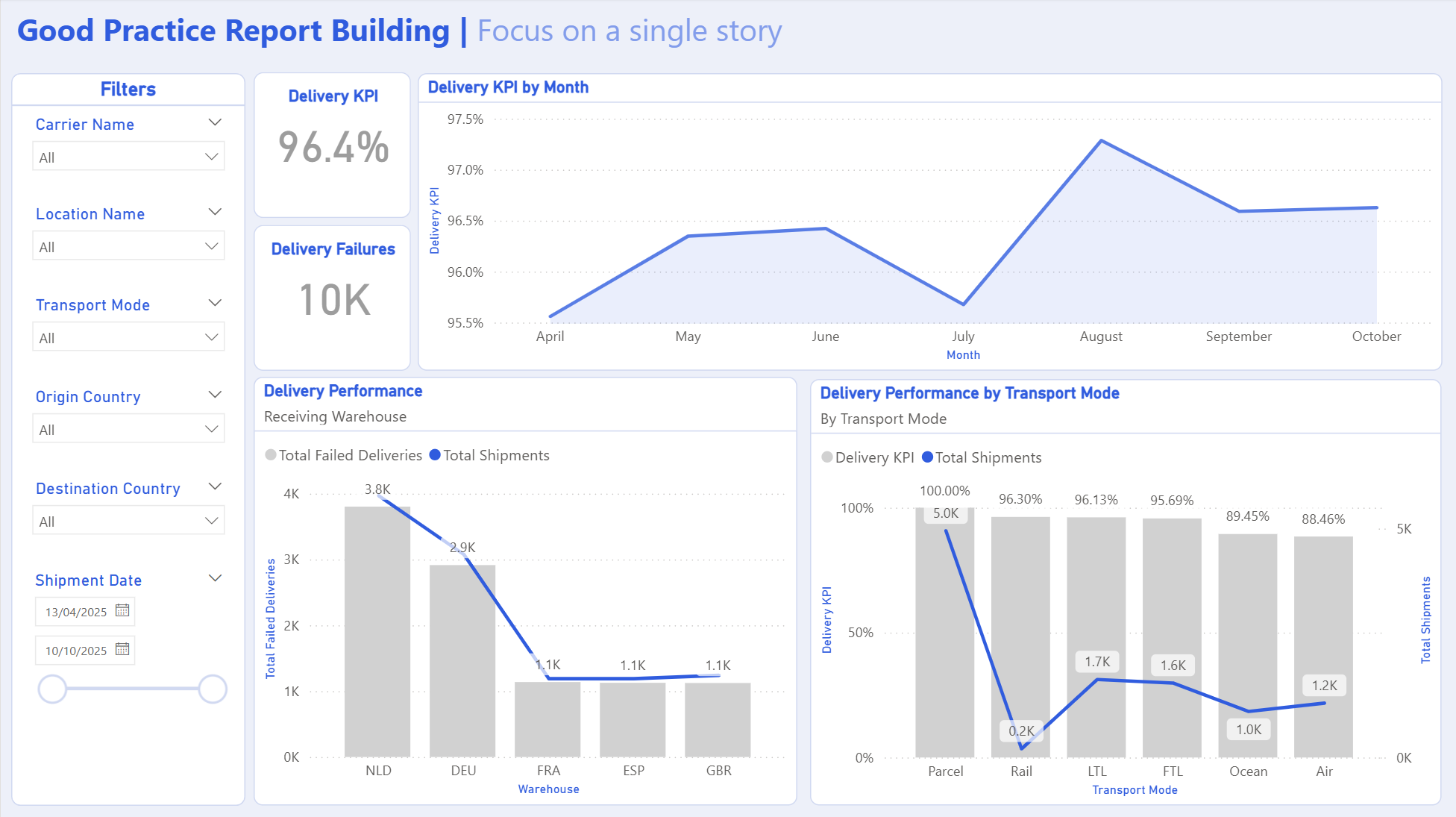
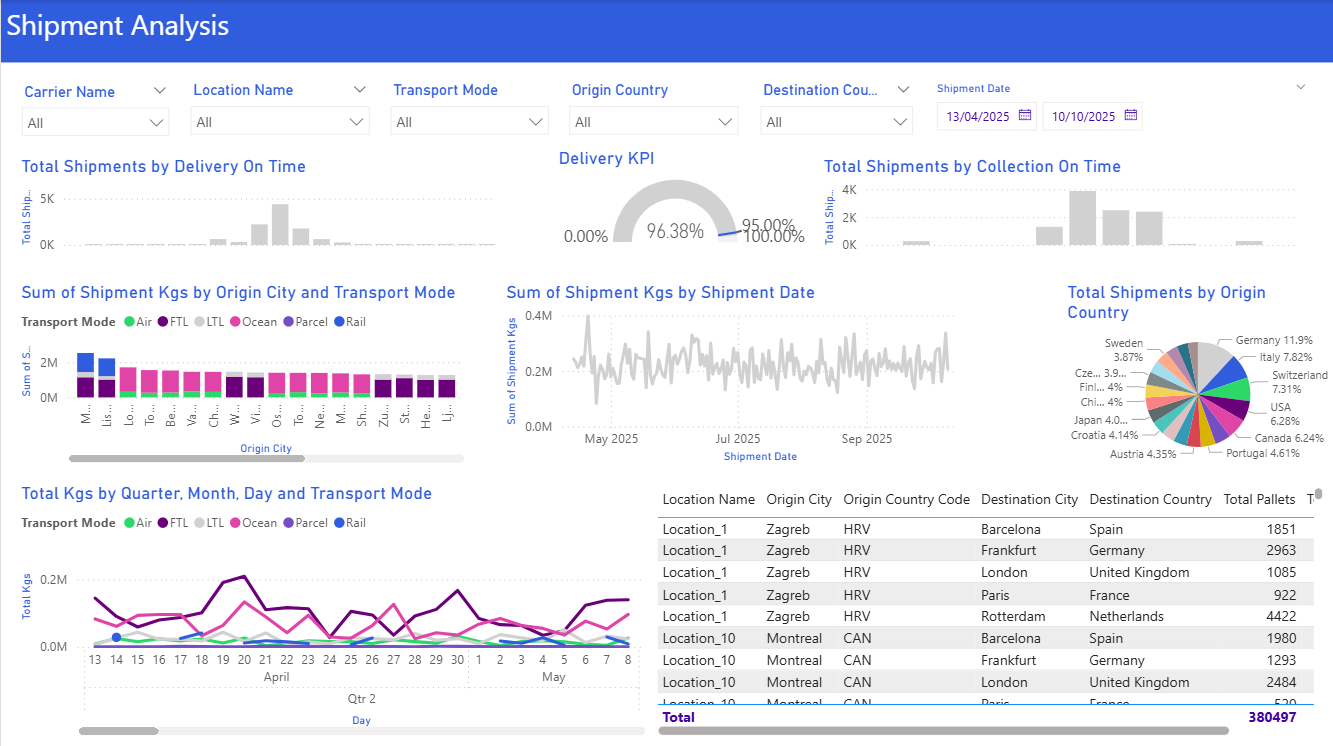
Different stakeholders have different needs requiring different insights to support them.
Big picture trends, growth opportunities, risks and customer satisfaction. They make decisions that impact long-term strategy and resource allocation.
Use high-level summaries with clear KPIs. Focus on implications and recommendations, not granular details. Use scorecards, simple trend lines, and forecasts.
Day-to-day performance, process efficiency, bottlenecks and visibility. They need metrics that help them act immediately.
Provide detailed breakdowns and actionable alerts. Use real-time or near-real-time data. Use tables, heatmaps, and detailed charts for drill-through analysis.
Clear, easy-to-understand information about their service or product. Transparency without overwhelming technical jargon.
Use plain language and simple visuals. Highlight benefits, timelines, and outcomes. Progress bars, simple cards, and status indicators work well.
You are the bridge between information and insights. Your goal is to translate complex data into an intuitive narrative that makes it easy for your organisation to make faster and better decisions.
Decision-based design: Ask yourself what can be learned from the visuals you're building. Your goal is to captivate, inform, and advise your audience. The right visualisation technique will do all three.
Effective visuals spark curiosity: "Why do we have lower productivity in this warehouse?"
Learn from common visualization mistakes.
| ❌ Don't | Why It's a Problem | ✅ Do Instead |
|---|---|---|
| Use 3D charts | Distorts perception of values and makes comparisons difficult | Use 2D charts for clarity |
| Too many colours | Creates confusion and visual fatigue | Limit to 3–5 colours with consistent palette |
| Truncate axes | Misleading unless justified | Start axes at zero or clearly justify truncation |
| Overload with data | Audience can't find the key message | Highlight key metrics and use filters |
| No context or labels | Leaves interpretation open | Always include titles, legends, and units |
| Decorative elements | Adds unnecessary noise without value | Remove unnecessary graphics - every pixel has purpose |
| Data tables instead of visuals | Too much information - asking audience to make their own insights | Use appropriate visualizations to tell the story |